Home › Page Watch
Page Watch: Auto Refresh and Text Alert
Auto-refresh a tab and get an alert when the text you want appears. No subscription, no tracking. Pro: regex, changes, sound.
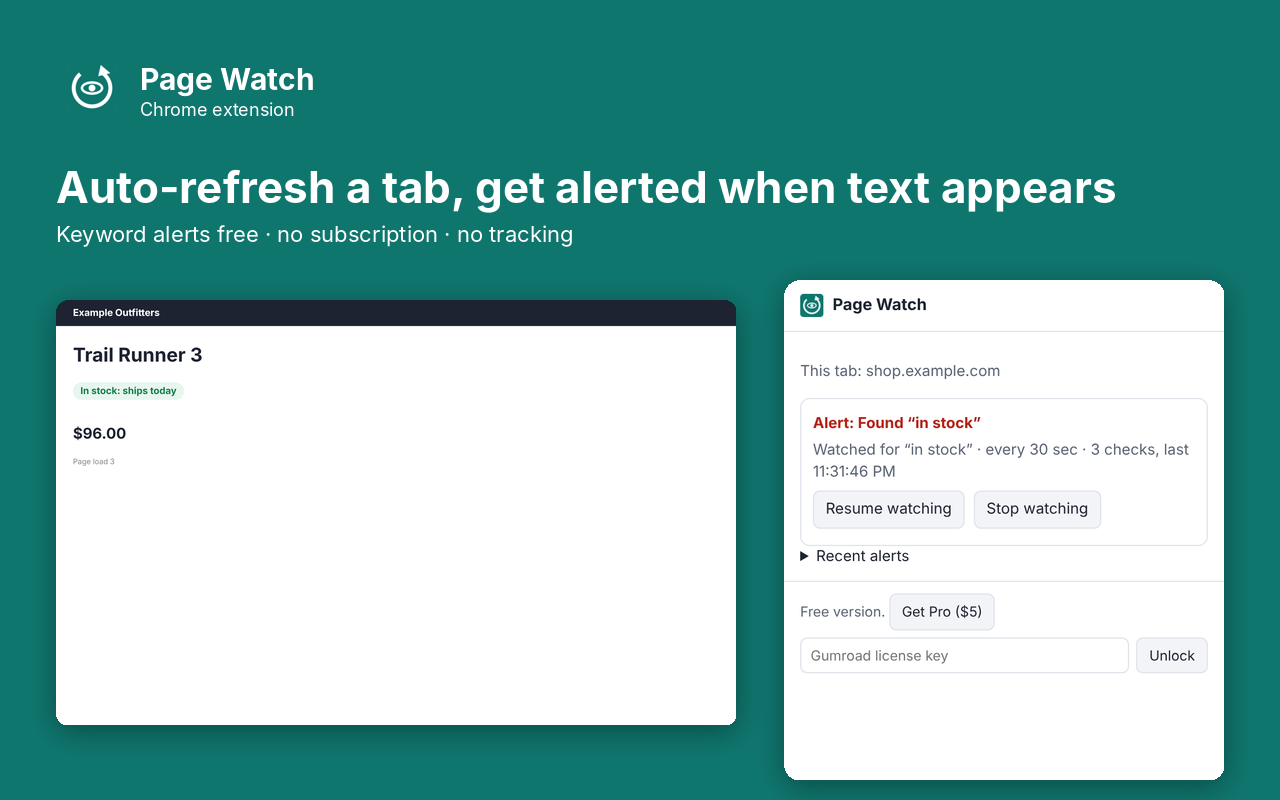
What it does
Page Watch refreshes a tab on a timer and tells you the moment the text you are waiting for shows up: "In stock", a new appointment slot, a price, a reply. Type a word, pick how often to refresh, and leave the tab alone. When the text appears you get a desktop notification and a badge on the icon, and refreshing stops so you don't lose the page. The keyword alert is free, not locked behind a subscription. Pro is a one-time $5 for several phrases, regex, "tell me when it's gone", any-change alerts, a picked page area and a sound. No ads, no tracking, and it reads only the sites you choose to watch.
- Refresh any tab every 30 seconds to 1 hour
- Alert when a word or phrase appears, ignoring capital letters and extra spaces
- Desktop notification plus a badge on the icon; click the notification to jump to the tab
- Stops refreshing when it alerts, so the page you were waiting for stays put
- Watch two tabs at once
- Asks to read a site only when you start watching it, and only that site
- No account, no tracking, nothing leaves your browser
Pro: $5 once
- Several phrases at once (alert on any) and regular expressions
- Alert when text disappears (for example when "Sold out" goes away)
- Alert when anything on the page changes, with the first new line in the notification
- Pick one part of the page to watch, so ads and clocks don't trigger alerts
- Alert sound, and a slightly varied refresh interval
- Watch any number of tabs
Buy on Gumroad, then paste the license key into the extension's popup. No subscription.
Questions
Is the keyword alert really free?
Yes. Refreshing on a timer and alerting when one word or phrase appears is free with no limit on time. Pro ($5 once, no subscription) adds several phrases, regex, disappear and any-change alerts, a picked page area, sound and unlimited tabs.
Why can't it refresh faster than every 30 seconds?
Chrome runs extension timers at most every 30 seconds. Refreshing faster also gets people rate-limited or blocked by many sites.
Will it keep refreshing if I close the tab or restart Chrome?
No. Closing a watched tab ends its watch, and a browser restart clears all watches, because Chrome gives restored tabs new ids. Start the watch again from the toolbar button.
Does it send my pages anywhere?
No. The page text is read and compared inside Chrome on your computer. The only network request the extension makes on its own is the Gumroad license check when you unlock Pro.
Can it click buttons or buy things for me?
No. It only watches and alerts. You stay in control of what you click.
Privacy policy for Page Watch
Last updated 2026-10-10.
Page Watch does not collect, sell or share your data. It has no analytics, no ads, no account and no server of its own. Everything it reads or saves stays in Chrome on your computer.
- What it reads: Refresh a tab the user chooses on a timer and alert the user when text they typed appears, disappears or changes on that page. It reads only the tabs you choose to watch, after each refresh, and stops when you stop watching.
- What it stores: your settings, the pages you are watching and your recent alerts and whether Pro is unlocked, in Chrome's local extension storage. Uninstalling the extension deletes it.
- The one network request: when you unlock Pro, the license key you type is sent to Gumroad's license check (api.gumroad.com) to confirm the purchase, and checked again about once a month. Gumroad's privacy policy covers that request. Nothing else is sent.
- Payments are handled by Gumroad. We never see your card details.
Why each permission is needed
- alarms: Schedules each refresh of a watched tab (every 30 seconds or longer).
- notifications: Shows the desktop alert when the watched text appears, disappears or changes.
- scripting: Reads the visible text of a watched tab after each refresh, and runs the area picker when the user clicks Pick area.
- activeTab: Lets the popup see which page the user wants to watch when they click the toolbar button.
- offscreen: Plays the optional alert sound from a hidden extension page. The sound is generated in the extension; nothing is downloaded.
- storage: Saves the user's watch settings, the list of recent alerts and Pro status.
- optional api.gumroad.com: Requested only when the user enters a license key; used to check that key with Gumroad's license API.
- optional *://*/* (one site at a time): When the user starts watching a page, Chrome asks for read access to that one site, so the extension can read the page again after each refresh. Sites the user never watches are never read.
This extension's use of information follows the Chrome Web Store User Data Policy, including the Limited Use requirements.